How to Install IBO Player Pro on Firestick, Fire TV and Android
The IBO Player Pro code for Downloader is 481220. Once the app is on your Firestick, it shows a MAC address and a Device Key, and those two values are how your playlist gets linked. Android users can install it from Google Play instead. The whole job takes about ten minutes.
Before you start
- A Firestick, Fire TV, Android TV, Android box or Android phone online.
- Your 4K Empire playlist: an M3U link, or a server URL, username and password.
- A phone or computer to upload the playlist.
Install IBO Player Pro on Android, Android TV and boxes
On Android, IBO Player Pro is in the Google Play Store, so there is no need for Downloader:
- Open the Google Play Store.
- Search for IBO Player Pro and select Install.
- Open the app and write down the MAC address and Device Key on the first screen.
- Upload your playlist on iboproapp.com as described in step 7 below.
If the Play Store version will not install on your device, the official APK is also available at iboproapp.com/ibopro.apk.
Install IBO Player Pro on Firestick and Fire TV
New to Downloader? See our Downloader guide for steps 1 and 2 in detail.
Steps 1 and 2: Get Downloader ready
If Downloader is already on your Fire TV, jump to step 3. If not, search for it under Find, install it, and allow it in Install unknown apps (Settings › My Fire TV › Developer options). It takes about two minutes.
Step 3: Open Downloader
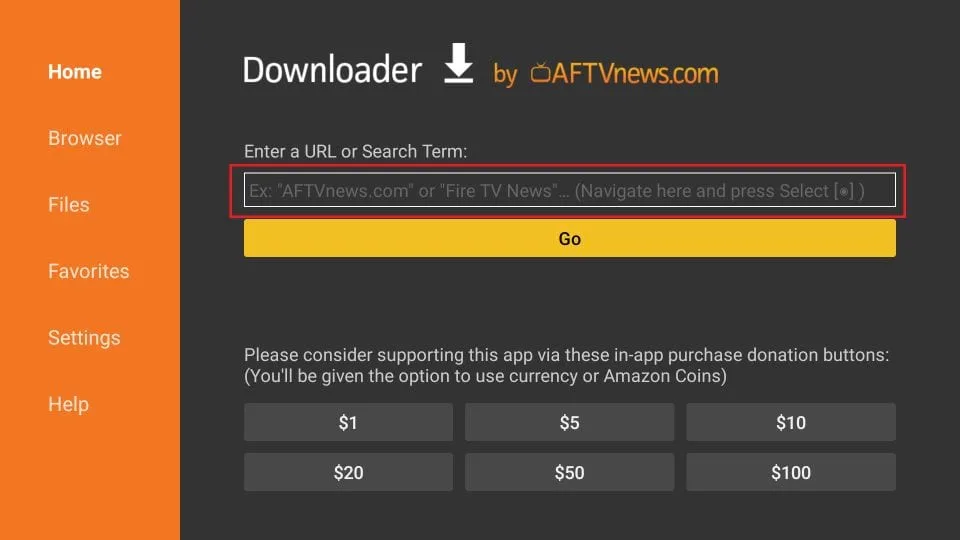
Launch Downloader and select the address box on the Home tab.
Step 4: Type the IBO Player code
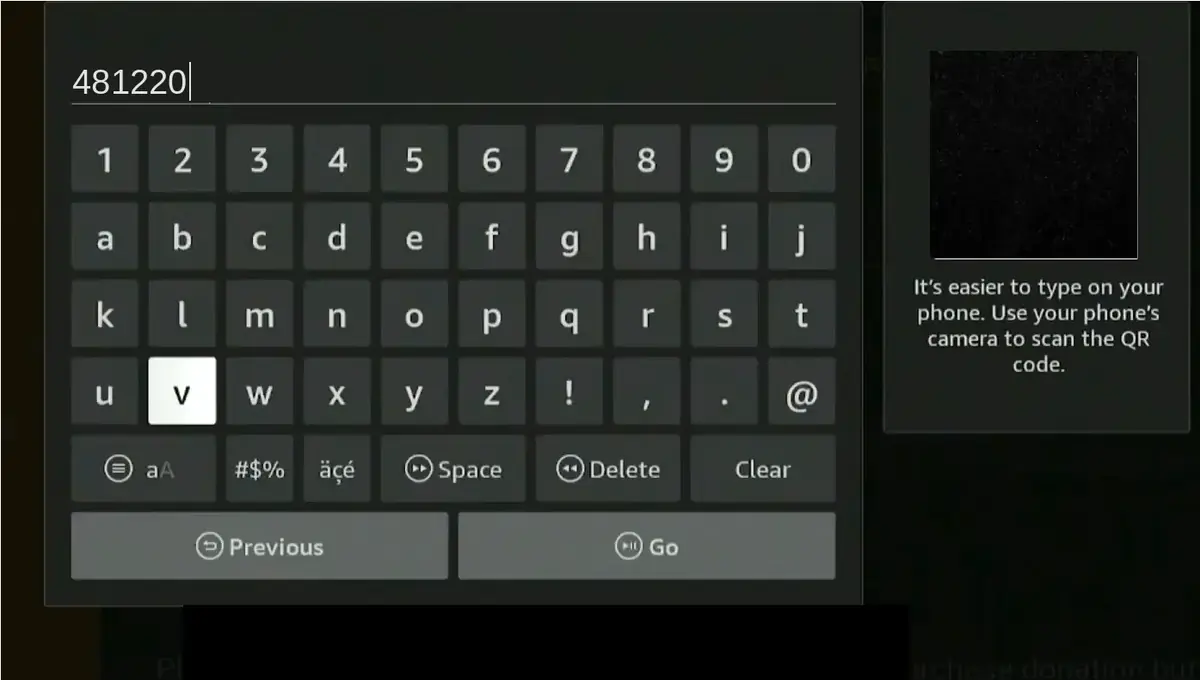
Enter the code below and press Go (you can also type the full address iboproapp.com/ibopro.apk). When the download finishes, select Install, then Done.
Step 5: Open IBO Player Pro
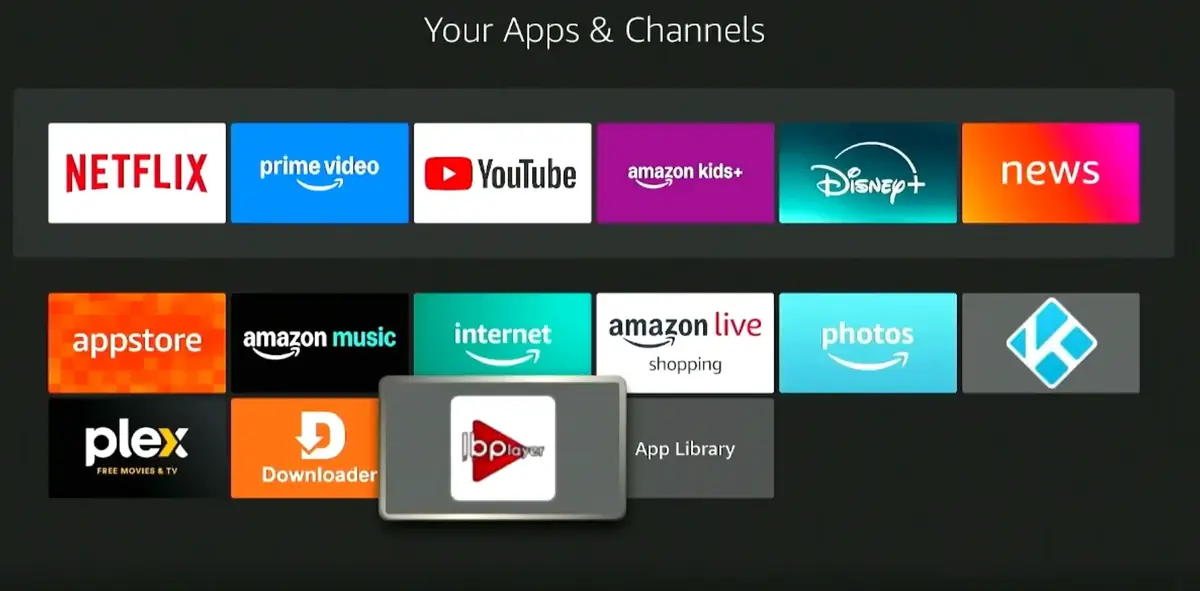
Hold Home, choose Apps and open IBO Player Pro from Your Apps & Channels. Move it to the front row for quick access.
Step 6: Note your MAC address and Device Key
The first screen of IBO Player Pro shows your MAC address and Device Key. Write both down exactly.
Step 7: Upload your playlist
On your phone or computer, open the official site iboproapp.com and go to the playlist manager. Sign in with your MAC address and Device Key, then add your 4K Empire playlist: the M3U link, or the server URL, username and password (Xtream Codes). Save, restart IBO Player Pro on the TV, and your channels, films and series load.
Activating IBO Player Pro
IBO Player Pro is free to download and comes with a trial period. After that, the app asks for a one-time activation, bought on iboproapp.com or inside the app. Activation is tied to the device's MAC address, so each TV or Firestick needs its own.
IBO Player Pro tips
- Playlist not showing? Make sure the MAC address and Device Key on the website match the app exactly, then restart the app.
- New device? A new Firestick or TV has a new MAC address, so add your playlist again for it.
- Picture keeps pausing? IBO Player is fine on most sticks, so look at the connection first: move to 5 GHz Wi-Fi or plug in an Ethernet adapter.
Small settings that make IBO Player Pro better
- Use the Xtream Codes login if you have the choice. It pulls in the TV guide, films and series by itself, while a plain M3U link sometimes leaves the guide empty.
- Plug in the cable on smart TVs. Samsung, LG and Hisense sets all have a network port, and it is far steadier than Wi-Fi from the other end of the house.
- Restart once after adding the playlist. Close the app fully and open it again so everything loads properly the first time.
Frequently asked questions
Is IBO Player Pro on Google Play?
Yes. On Android phones, Android TV and Google TV boxes, search for IBO Player Pro in the Google Play Store. On Firestick, install it with Downloader.
What is the Downloader code for IBO Player Pro?
Type 481220 in the Downloader address box, or the full address iboproapp.com/ibopro.apk, then press Go and install.
Where are the MAC address and Device Key?
They appear on the first screen when you open IBO Player Pro.
Is IBO Player Pro free?
It is free to download with a trial period. After that, each device needs a one-time activation bought on iboproapp.com or in the app.
Do I need to pay for IBO Player Pro?
IBO Player Pro has a short free trial, then asks for a small activation fee for the app. That is separate from your channel subscription.
Stuck on a step?
Send us a WhatsApp with a photo of your screen and we will tell you what to press next. You can also test everything free for 24 hours first. See the plans, from €9.99 a month.
Get a Free TrialKeep reading
How to Install Downloader on Firestick and Fire TV
The first app every Firestick owner needs. Set it up once in about 5 minutes.
Read the guide →
How to Install TiviMate on Firestick and Fire TV
Get TiviMate running on your Amazon Firestick in about 10 minutes, with a screenshot for every click.
Read the guide →
How to Install Hot Player on Firestick, Fire TV and Android
Install Hot Player with code 395800 on Firestick, or from Google Play on Android, then add your playlist.
Read the guide →