How to Install XCIPTV Player on Firestick and Fire TV
Got an older Firestick that struggles with heavier apps? XCIPTV is free, light and still has a TV guide, catch-up and recording. Its Downloader code is 250931, and it accepts both Xtream Codes and M3U logins.
Before you start
- A Firestick, Fire TV Stick 4K, Fire TV Cube or Fire TV smart TV online.
- Your 4K Empire login: server URL, username and password, or an M3U link.
- Around ten minutes.
Need help with Downloader first? Read how to install Downloader on Firestick.
How to install XCIPTV Player on Firestick
Steps 1 and 2: Get Downloader ready
Got Downloader set up from an earlier guide? Move on to step 3. Otherwise, add it from Find › Search and give it permission in Install unknown apps; our Downloader guide shows each screen.
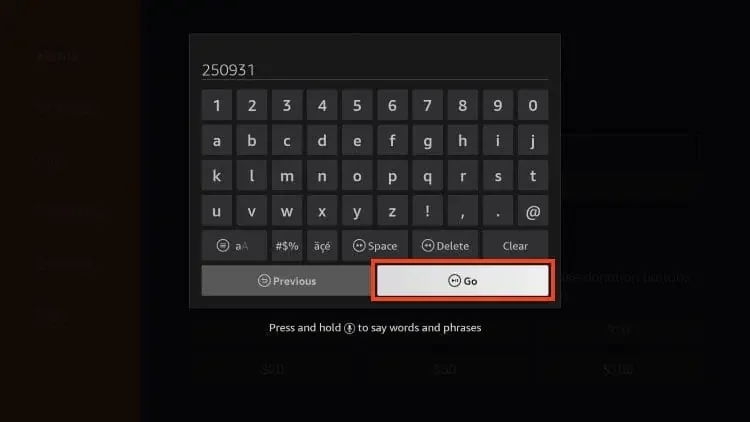
Step 3: Type the Downloader code
Open Downloader, select the address box on the Home tab, type the code below and press Go. It opens the TROYPOINT Toolbox, a free app library.
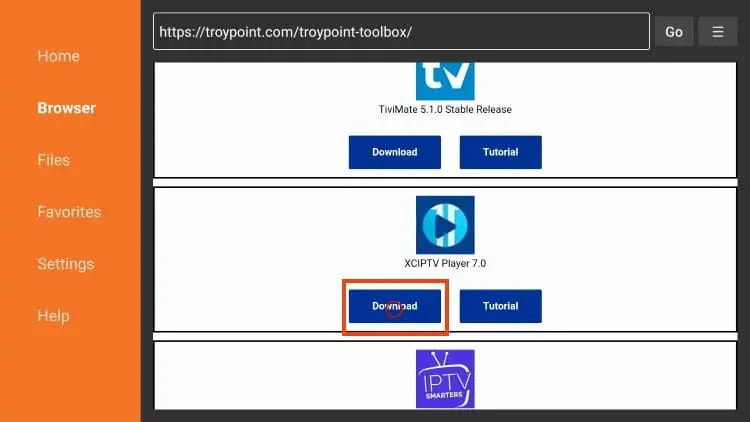
Step 4: Download XCIPTV Player
Scroll down to XCIPTV Player and select Download.
Step 5: Install XCIPTV
When the download is done, select Install, then Done.

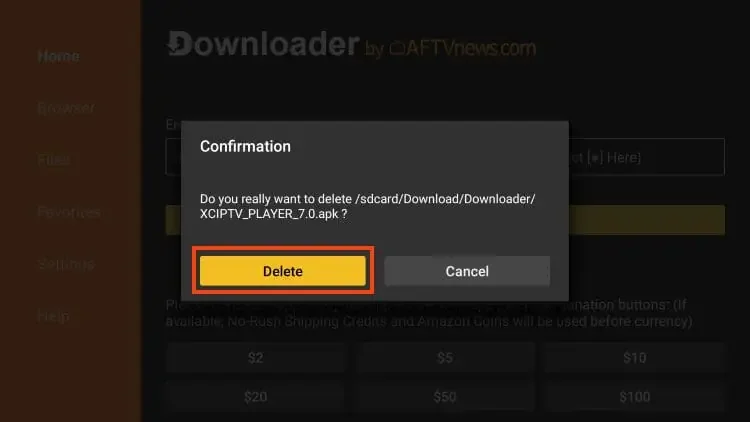
Step 6: Delete the installer
Downloader offers to delete the APK. Select Delete twice to save space. XCIPTV stays installed.
How to sign in to XCIPTV with your IPTV login
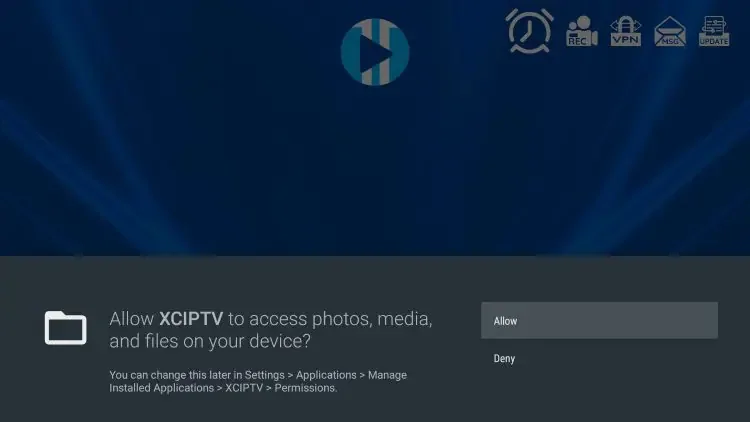
Step 7: Open XCIPTV and allow access
Open XCIPTV from Your Apps & Channels. If it asks for access to photos, media and files, select Allow.
Step 8: Choose your login type
Pick Xtream Codes API if you have a server URL, username and password, or M3U URL if you have a single playlist link.
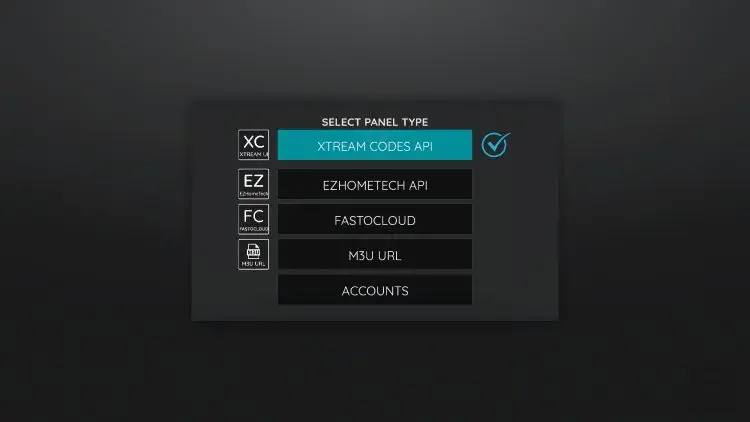
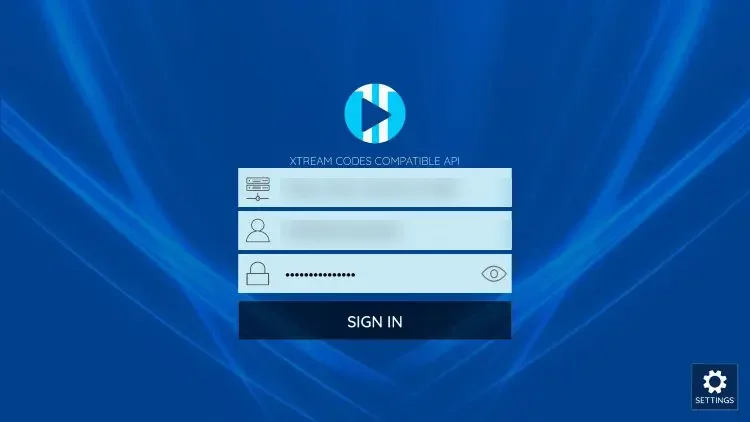
Step 9: Sign in
Enter your server URL, username and password exactly as we sent them, then select Sign in. Your channels, films and series load straight away.
XCIPTV tips
- Sign-in failed? Check the server URL first, including
http://orhttps://and the port number, then your username and password. - More than one account? Use Accounts on the panel type screen to save and switch between logins.
- Buffering on an older stick? XCIPTV is light, but a first-generation Firestick on 2.4 GHz Wi-Fi will still struggle. Switch to 5 GHz if your router offers it.
Getting a smoother picture from XCIPTV
- Swap the video engine if a channel stutters. XCIPTV has more than one player built in, and switching between them in Settings often fixes a stubborn channel.
- Sign in with Xtream Codes rather than an M3U link, so the TV guide fills in on its own.
- Keep it on older hardware. If your first-generation Firestick struggles with heavier apps, XCIPTV is often the one that runs comfortably.
XCIPTV troubleshooting
If XCIPTV opens but something is not right, these fixes solve most cases:
- "Login failed" or "Invalid credentials": retype the server URL, username and password exactly as sent, including http:// and the port number. Watch for spaces at the end.
- Channels load but the guide is empty: open Settings › EPG, refresh it and set the time zone to Dublin. Our guide to a missing TV guide goes further.
- The app closes or freezes: clear the XCIPTV cache in Settings › Applications, then restart the Fire TV.
- Picture stutters on big nights: use a cable or 5 GHz Wi-Fi, and close other apps running in the background.
Prefer a different layout? TiviMate and Hot Player use the same login details.
Frequently asked questions
Is XCIPTV Player free?
Yes. XCIPTV Player is free to download and use. You only need your own IPTV login.
What is the Downloader code for XCIPTV?
Type 250931 in Downloader to open the TROYPOINT Toolbox, then download XCIPTV Player from the list.
Is XCIPTV on Google Play?
Yes, for Android phones, tablets and Android TV. On Firestick and Fire TV you install it with Downloader.
Should I choose Xtream Codes API or M3U URL?
Use the one we sent you. Xtream Codes API also loads the TV guide and the films and series sections automatically.
Is XCIPTV good for an old Firestick?
Yes. It is one of the lightest players around, so it usually runs smoothly on older sticks that struggle with bigger apps.
Can I use my login on XCIPTV and another app?
Yes. The same Xtream Codes login works in other players, but your plan sets how many screens can play at the same time.
Stuck on a step?
Send us a WhatsApp with a photo of your screen and we will tell you what to press next. You can also test everything free for 24 hours first. See the plans, from €9.99 a month.
Get a Free TrialKeep reading
How to Install Downloader on Firestick and Fire TV
The first app every Firestick owner needs. Set it up once in about 5 minutes.
Read the guide →
How to Install TiviMate on Firestick and Fire TV
Get TiviMate running on your Amazon Firestick in about 10 minutes, with a screenshot for every click.
Read the guide →
How to Install Hot Player on Firestick, Fire TV and Android
Install Hot Player with code 395800 on Firestick, or from Google Play on Android, then add your playlist.
Read the guide →