How to Install Flix IPTV on Firestick and Upload Your Playlist
Installing Flix IPTV is quick. The part that trips people up is afterwards: finding the MAC address and uploading the playlist on the Flix website. So that is where this walkthrough spends most of its time, with a screenshot for each click.
Before you start
- A Firestick, Fire TV Stick 4K, Fire TV Cube or Fire TV smart TV with an internet connection.
- Your 4K Empire M3U link.
- A phone or computer to upload the playlist.
First time with Downloader? Our Downloader guide explains steps 1 and 2 in detail.
How to install Flix IPTV on Firestick and Fire TV
Steps 1 and 2: Get Downloader ready
You need the free Downloader app, with permission to install apps. Search for it from the Find tab, then turn it on in Developer options › Install unknown apps. Hidden menu? Press OK seven times on your device name under About.
Step 3: Type the Flix IPTV address
Open Downloader, select the address box on the Home tab, type the address below and press Go.
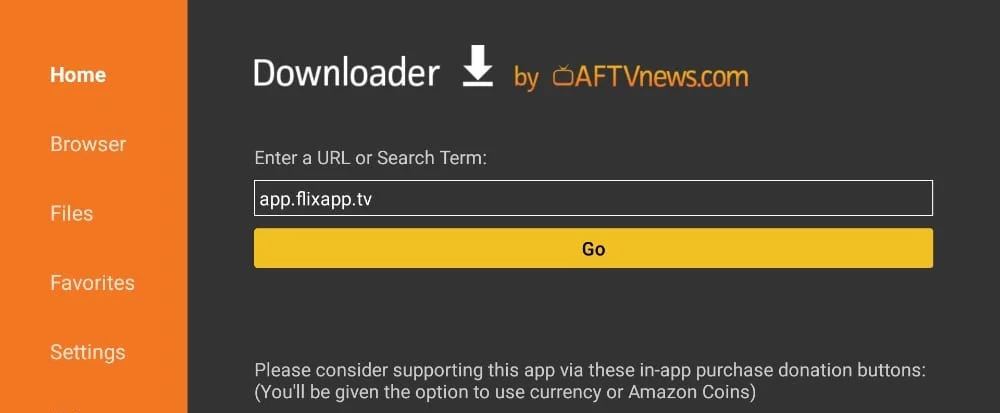
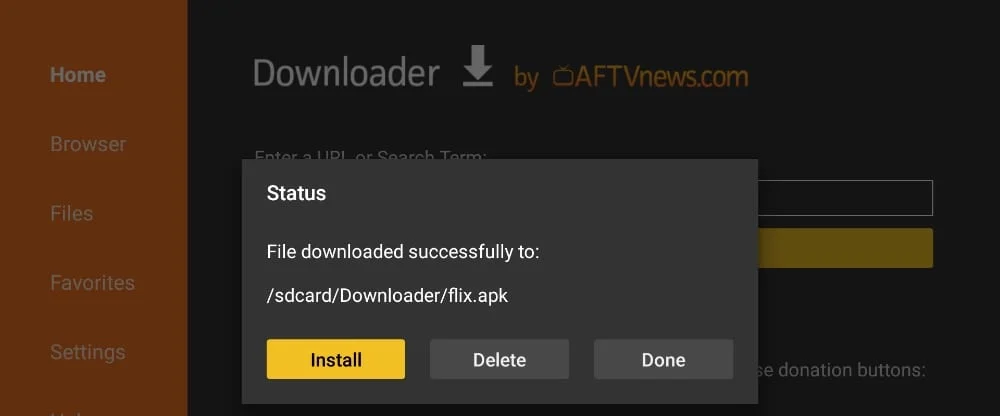
Step 4: Install Flix IPTV
When the download is complete, select Install.
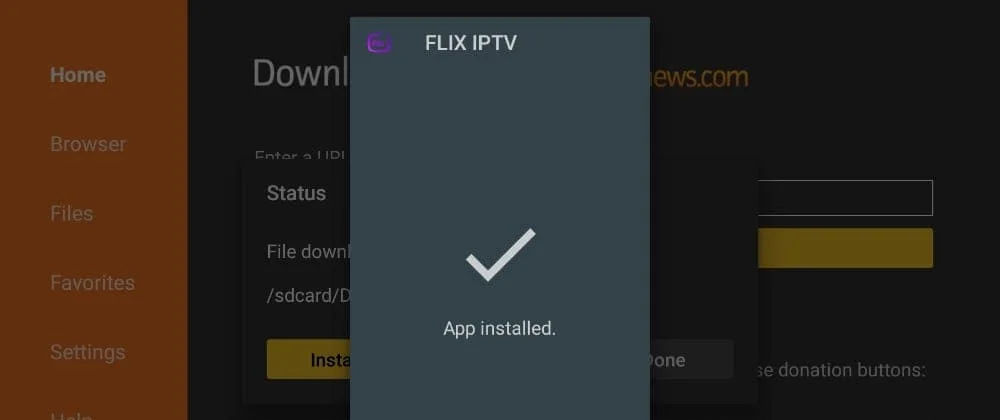
Step 5: Wait for "App installed"
A few seconds later you will see App installed. Select Done. Back in Downloader, choose Delete to remove the installer and free up space.
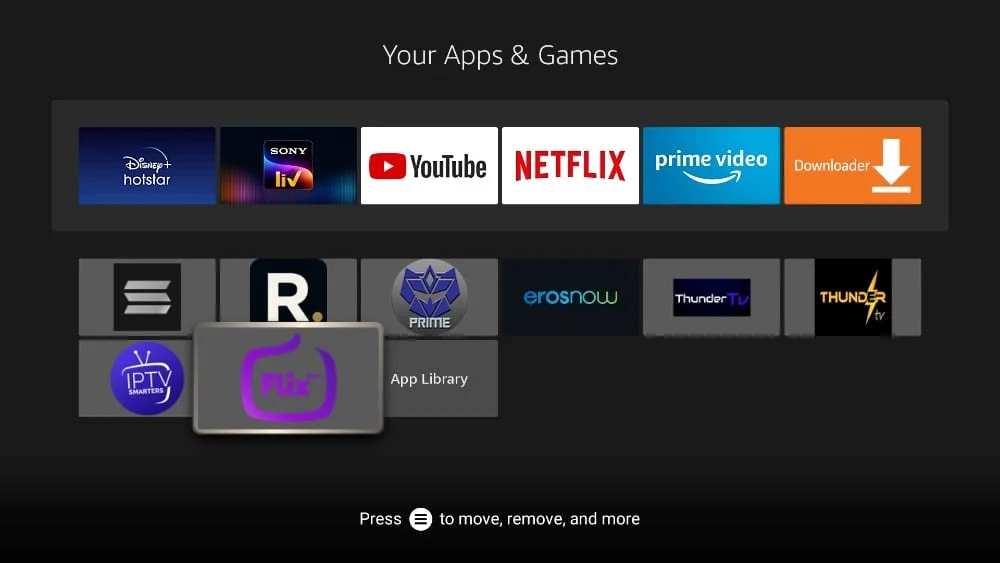
Step 6: Open Flix IPTV
Hold Home, select Apps and scroll to Flix IPTV. Press the menu button to move it to the front row.
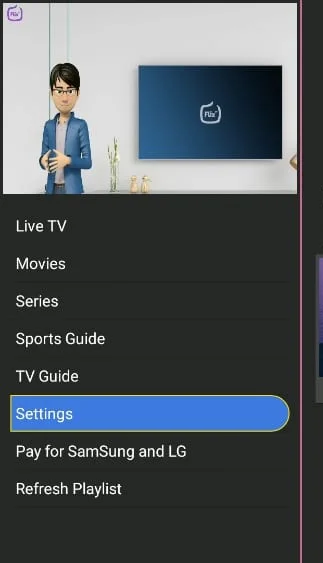
Step 7: Open Settings
In the menu on the left, choose Settings.
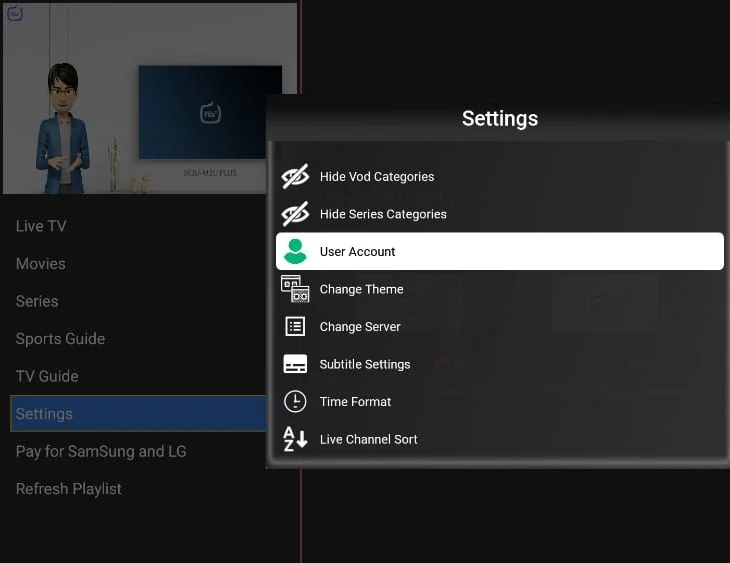
Step 8: Select User Account
Scroll down and open User Account.
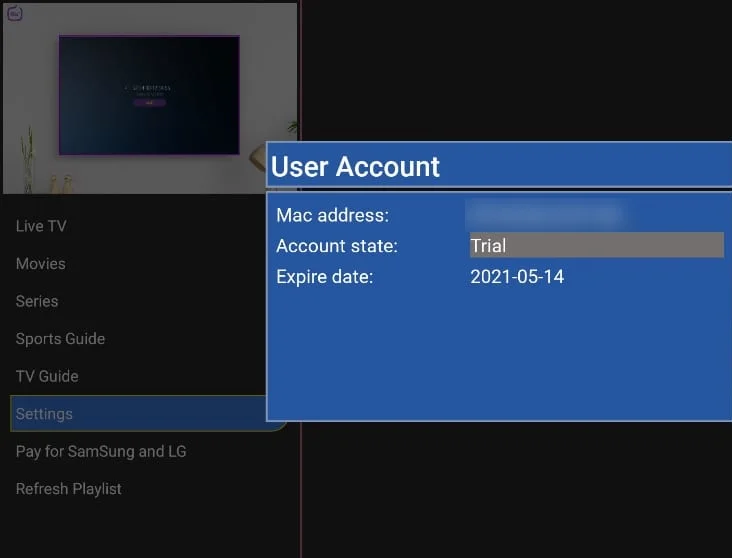
Step 9: Write down your MAC address
This screen shows your MAC address, your account state (Trial or Active) and the expiry date. Copy the MAC address down exactly.
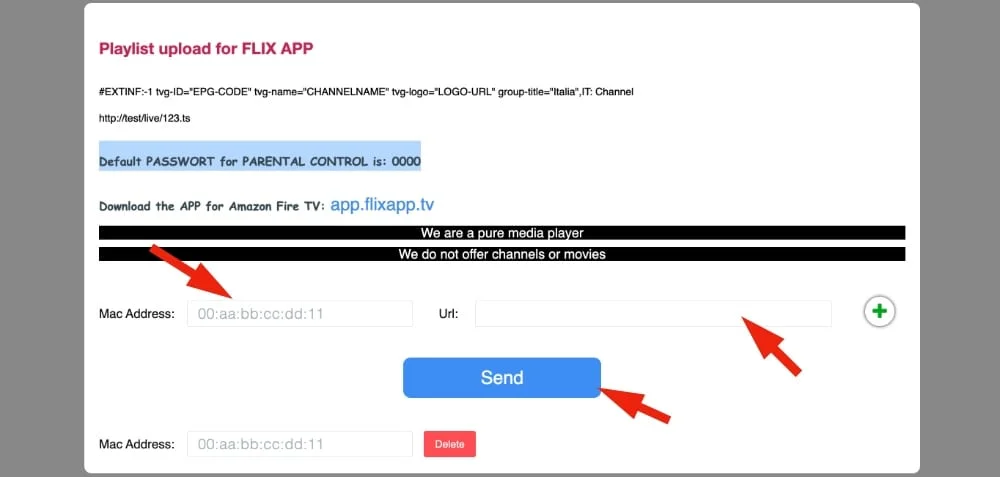
Step 10: Upload your playlist
On your phone or computer, go to flixapp.tv/mylist. Enter your MAC address and your 4K Empire M3U link in the URL field, then press Send. On the TV, open Refresh Playlist in the Flix menu and your channels, films and series load.
Where to find your M3U link
We send your playlist link on WhatsApp as soon as your subscription is active. It looks like this:
http://server-address:PORT/get.php?username=your-username&password=your-password&type=m3u_plus&output=ts
Copy it in full and paste it into the URL field on flixapp.tv/mylist.
Flix IPTV tips
- Trial and activation. Flix IPTV starts with a free trial. When it ends, activate the app for your device on flixapp.tv.
- Parental control. The default parental control PIN is 0000. Change it in Settings.
- No channels? Check that the MAC address on the website matches the app exactly, then use Refresh Playlist.
- Stream stalls after a few minutes? Restart the Firestick and the router, then try again. If it keeps happening, an Ethernet adapter usually settles it.
Why sports fans like Flix IPTV
The Sports Guide is the reason most people stay with Flix. It gathers upcoming fixtures in one screen, so on a busy weekend you can see the hurling, the rugby and the soccer without hunting through the channel list.
- Set the time format in Settings, and make sure the Fire TV is on Dublin time, so kick-offs show correctly.
- Give it a steady line on match day. 5 GHz Wi-Fi or a cable makes the difference when half the street is watching the same game.
Flix IPTV not loading your playlist?
If Flix IPTV shows an empty list after you upload your playlist, restart the app so it reloads it. Still empty? Check that the MAC address you entered on the website matches the one shown in the app, letter by letter, and that the playlist link has no extra spaces at the end. Remember that Flix IPTV only plays content: the channels come from your subscription, not from the app itself.
Frequently asked questions
Is Flix IPTV in the Amazon Appstore?
No. On Firestick and Fire TV you install it with the Downloader app by typing app.flixapp.tv.
Where is the MAC address in Flix IPTV?
Open Settings in the left-hand menu, then User Account. The MAC address is shown at the top.
How do I add my playlist to Flix IPTV?
Go to flixapp.tv/mylist, enter your MAC address and M3U link, then press Send. In the app, use Refresh Playlist.
What is the Flix IPTV parental control PIN?
The default PIN is 0000. You can change it in the app settings.
Does Flix IPTV have a sports guide?
Yes. The Sports Guide lists upcoming matches across your channels, which makes busy weekends much easier to plan.
Stuck on a step?
Send us a WhatsApp with a photo of your screen and we will tell you what to press next. You can also test everything free for 24 hours first. See the plans, from €9.99 a month.
Get a Free TrialKeep reading
How to Install Downloader on Firestick and Fire TV
The first app every Firestick owner needs. Set it up once in about 5 minutes.
Read the guide →
How to Install TiviMate on Firestick and Fire TV
Get TiviMate running on your Amazon Firestick in about 10 minutes, with a screenshot for every click.
Read the guide →
How to Install Hot Player on Firestick, Fire TV and Android
Install Hot Player with code 395800 on Firestick, or from Google Play on Android, then add your playlist.
Read the guide →